
Posto easily turns one post into several, each unique to one of your channels:
- it adds the channel's signature
- applies an individual watermark
- adds its own buttons
- changes the media and even the text itself
- schedules it for a different time
You can start right away — no setup in Settings required.
Creating a post for several channels
- Tap
Create postin the bottom menu or send/newpost. - Send the bot your content.
- Set up the formatting for the main channel: add a signature, buttons, and so on.
- Tap
Multi-postingand select the other channels. - Tap
More→Edit for other channels.
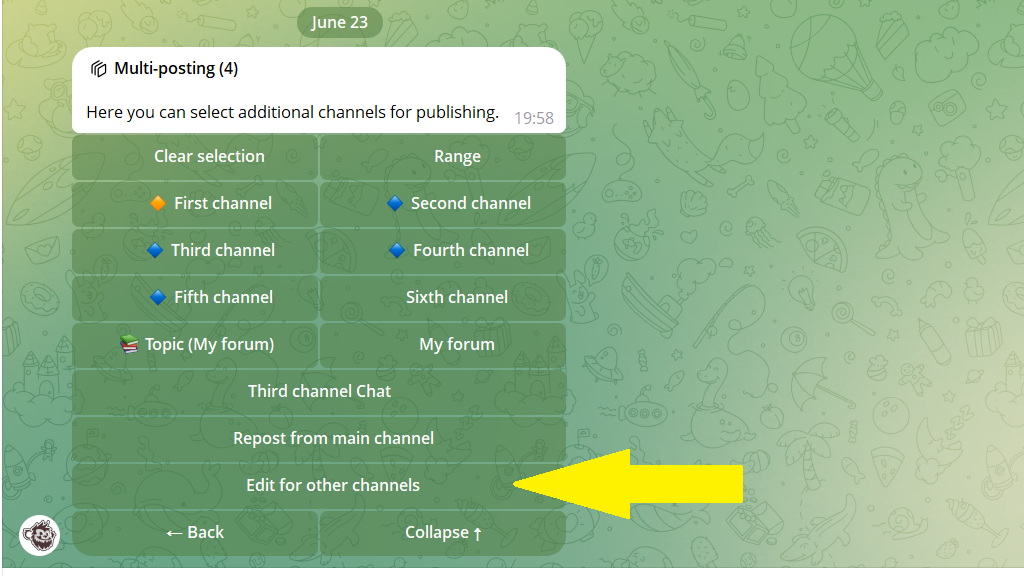
A menu with the settings for the additional channel opens. If you have several channels, you'll see a switcher between them at the bottom.
Important. Take note of the active channel's name so you know exactly where you're making changes.
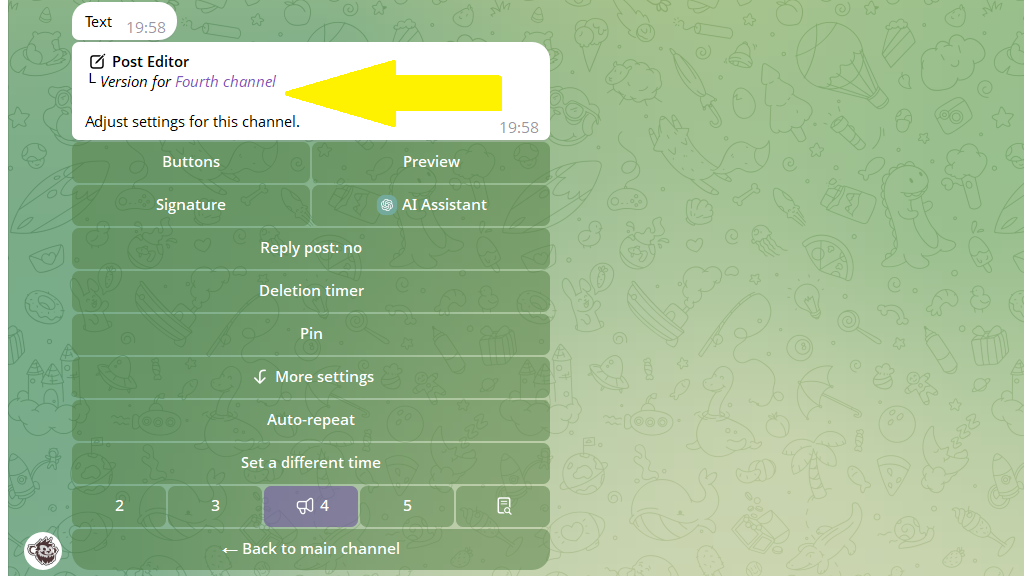
Now for each channel you can set its own publication time, a different auto-delete timer, pinning options, and more.
Once all the channels are set up:
6. Return to the main channel's menu.
7. Tap Publish or Postpone to set the time.
8. Confirm publication.
In the publication report, tap Save formatting and settings. This saves you from setting up your next posts from scratch — the bot will automatically apply the signatures, buttons, and other settings for each channel.
With Posto, running a channel network is simple!
