
When a piece of news goes out in several channels, copy-paste is a bad idea. If the audiences overlap, subscribers will see identical posts and unsubscribe.
The solution is rewriting with the AI Assistant. The bot reworks the text for each channel: it changes the style, the angle, and the formatting. You get a unique post with the same meaning.
Creating the main post
1. Tap Create post or send the /newpost command.
2. Choose the main channel and send the bot your content.
Copying to other channels
3. Tap Multi-posting and choose the additional channels.
4. Tap More → Edit for other channels → AI Assistant.
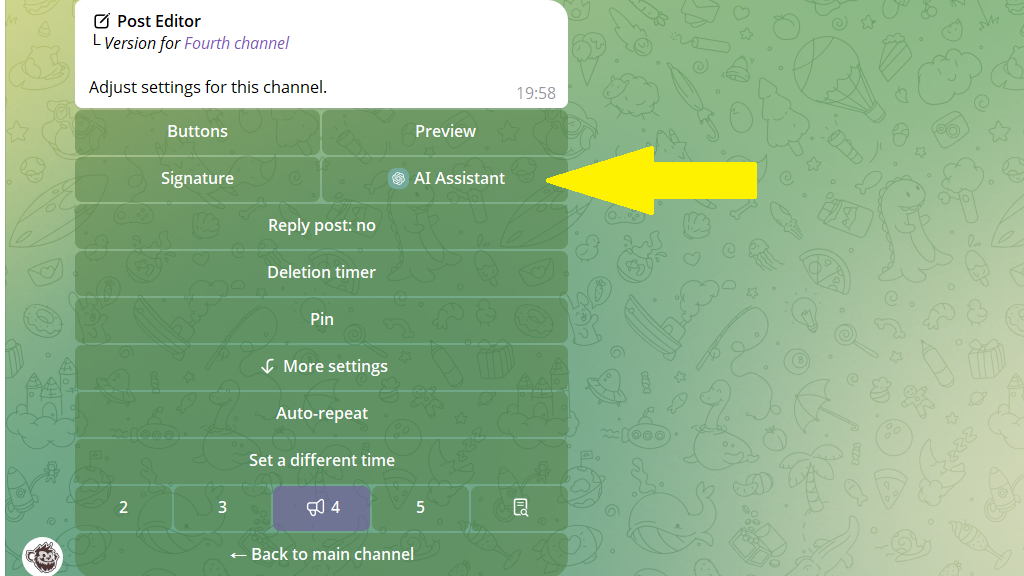
5. Send the bot a prompt — or choose one from your favorites — for how to rewrite the post for the additional channel. For example:
"Rephrase it, keeping the meaning but changing the structure"
"Make it shorter and snappier"
"Add more emotion and exclamations"
6. Tap Apply response.
Then use the navigation at the bottom of the menu to switch to the other channels and set a prompt there. Return to the main channel and tap Publish.
That's it! Each channel gets its own version of the post.
