
Skip to content
Posto/Help Center
Help Center
How to edit postsHow to edit post textHow to edit a buttonHow to edit a linkHow to edit a signatureHow to edit a watermarkHow to change a pinned post How to change a scheduled post's timeHow to change the deletion timer How to change the auto-repeat time or intervalHow to change the channel for a scheduled postHow to shuffle scheduled posts
Help/Beginners/How to edit post text

How to edit post text

Updated June 26, 2026·1 min read

You can change a post's text at any time. For example, if you spotted a mistake in a published post or want to tweak a scheduled one.

To change the text:

1. Open the post editing menu.

2. Tap Edit.
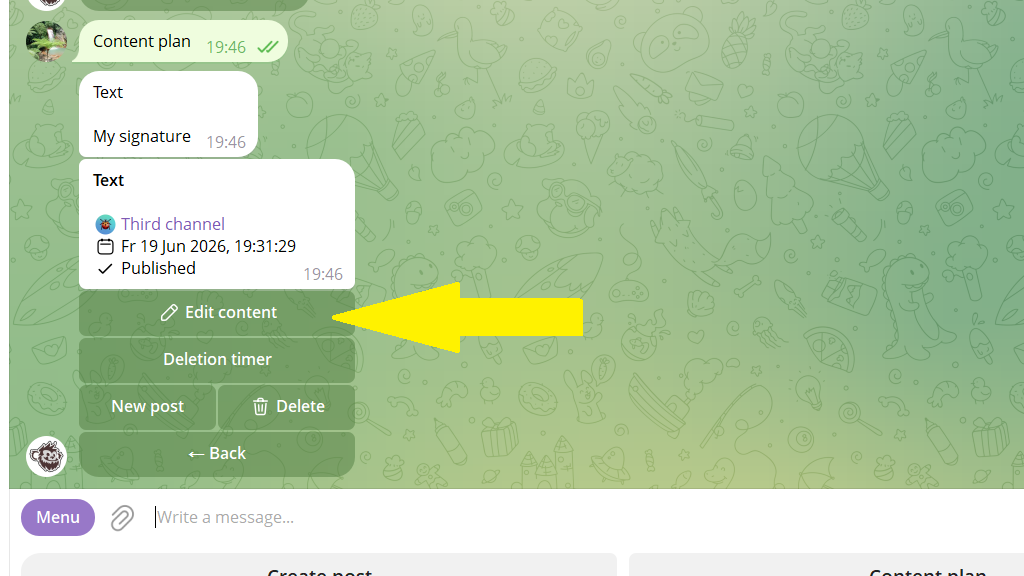
3. Enter the new text in place of the old one.
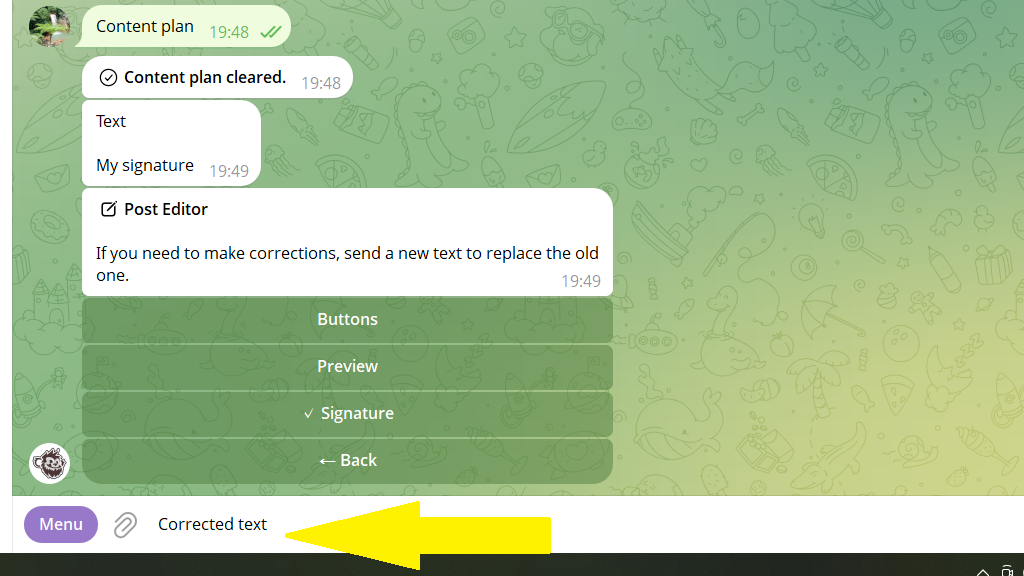
4. Tap Save.

PreviousHow to edit postsNextHow to edit a button

Related

Multiple messages in one postHow to edit a post across all channels at onceHow to edit a signatureHow to edit posts
Still stuck? Write to our support team on Telegram — real humans reply. Contact support →
© 2026 Posto
Privacy policyTerms of use